

Cutting the Fluff

TL;DR: Recognizing immense user frustration caused by ad-heavy, cluttered web content, I developed an AI-powered web scraping agent to solve the “doom scroll”. This tool intelligently parses complex, varied webpage structures to isolate and deliver only the essential ingredients and instructions, creating a frictionless user experience. The project demonstrates how targeted AI application can solve everyday usability problems by simplifying information retrieval from messy sources.
https://masterchefextractor.online/
The Problem: The Recipe “Doom Scroll”
We have all been there. It’s 6:30 PM, you’re hungry, and you just want to know how to make a chicken stir-fry. You click a promising link on Google, and instead of a recipe, you are bombarded with:
- A 2,000-word backstory about the author’s grandmother’s garden in 1995.
- Three separate pop-ups asking for your email address.
- Auto playing video ads that follow you down the page.
- Buried somewhere at the bottom: the actual ingredients.
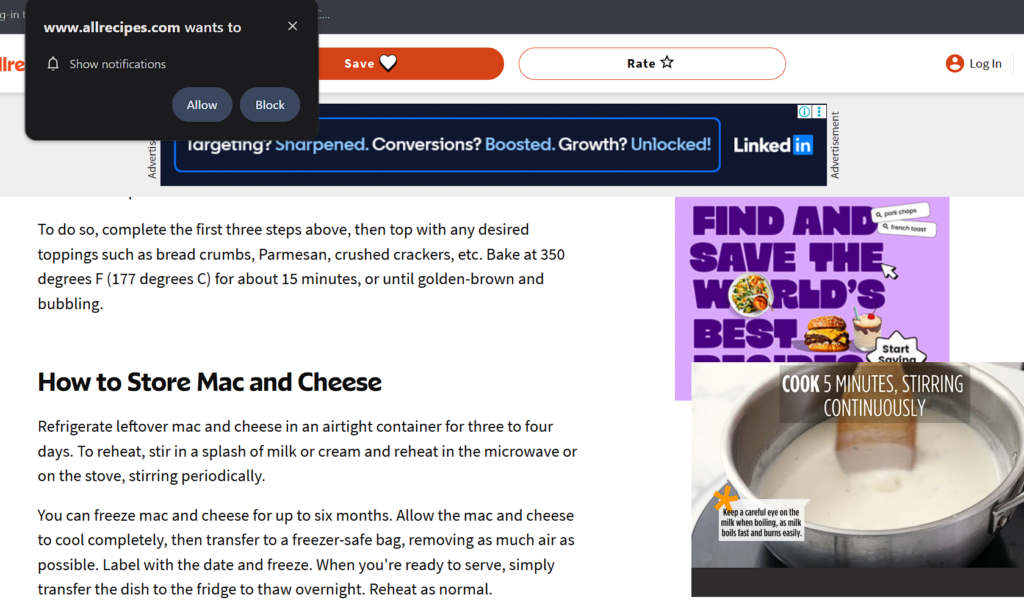
As a Product Manager obsessed with user experience, I saw this not just as an annoyance, but as a broken user journey. The user intent is simple (“Get recipe”), but the current solutions put massive friction between the user and their goal to maximize ad revenue.
Let’s fix this connection.
The Vision: Simplicity
Vision was simple: Input TEXT/URL -> Output Recipe. Nothing else.
I wanted to strip away everything that wasn’t essential to the user goal.
However, building a traditional web scraper based on fixed HTML selectors (like Regex) fails because every recipe blog uses a different layout. One site might use <ul> tags for ingredients, another might just use bold text in paragraphs. It was too brittle.
The solution required intelligence—an agent that could “read” a webpage like a human does and understand context.
The “How”: Building the AI Scraping Agent
To achieve this, I built a workflow combining traditional web requests with an AI parsing layer. The goal was to create a generalized extractor that didn’t rely on hard-coded rules for specific domains.
Here is the technical workflow I designed and implemented:
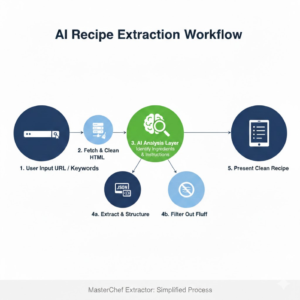
- User Input: User pastes a URL / ingredients into the simple frontend interface.
- Fetch & Clean: The backend Python agent fetches the raw HTML and performs initial cleaning (removing obvious script tags, styles, and known ad-server footprints).
- AI Analysis Layer (The Brain): The cleaned structure is fed into an NLP model designed to identify the structural blocks. It looks for patterns indicating lists of quantities (ingredients) and sequential imperative sentences (instructions), ignoring the “fluff” text surrounding them.
- Extraction & Structuring: The identified blocks are extracted and formatted into clean JSON.
- Presentation: The frontend renders the pure data in a minimalist, easy-to-read format.
The Result: MasterChef Extractor
The final product achieves the goal of zero-friction information retrieval. It successfully handles a wide variety of recipe site layouts, turning a frustrating 5-minute scrolling ordeal into a 5-second interaction.
It transforms the noisy internet into usable information.
Product Management Takeaways
- Focus on the Core Job-to-be-Done: The user doesn’t want to “read a blog”; they want to “cook a meal.” By focusing relentlessly on that job, I was able to define the MVP features clearly.
- AI as a UX Enhancer: AI isn’t just for chatbots. In this case, AI is used invisibly in the background to handle data variance, resulting in a simpler frontend experience.
- Latency Matters: The extraction needs to happen almost instantly. Optimizing the agent’s speed was crucial, as users will abandon the tool if it takes longer than loading the original cluttered site.
In the end, this project started with something small—a moment of frustration at 6:30 PM, scrolling endlessly just to find a simple recipe. But it turned into a deeper reflection on how often the internet gets in the way of what users are actually trying to do.
What stood out most was how powerful it is to focus on intent. The problem wasn’t a lack of information—it was too much of everything else. By stripping the experience down to only what matters, the solution didn’t feel like adding something new, but rather removing what shouldn’t have been there in the first place.
It also changed how I think about AI. The real value wasn’t in making the system feel “smart” to the user—it was in making it feel effortless. The intelligence stays hidden, doing the hard work quietly, so the experience can remain simple.
And maybe that’s the bigger takeaway: some of the best products don’t try to impress users—they just respect their time.